
To create an account, follow these steps:
- Enter your phone number & IIN. We’ll send you a confirmation code.
- Confirm your phone number. Enter the code sent to your number.
- Pass identity verification.
- Create login details:
- Enter your email.
- Create a password (min 6 characters, including at least one digit, an uppercase letter, and a lowercase letter).
- Confirm your password.
- Confirm your email. A code will be sent to your email for account protection.
- Create a passcode. This will be used to log in.
- Enable biometric verification (Face ID/Touch ID) for faster login (optional).
- Create and top up your first card and enjoy our services!
For any issues, contact support via the app or at support@cardb.finance
The cost of issuing and maintaining the card is as follows:
- Card issuance — 5,990 KZT
- Monthly maintenance — 5,990 KZT
- Card reissuance upon expiration or at the customer’s request — 5,990 KZT
For more details, please visit the “Tariffs“ page.
Yes, the following limits apply to topping up a CardB card:
- The maximum amount for non-cash deposits and cash deposits per month is 7,500,000 KZT
- The maximum amount for non-cash deposits and cash deposits per day is 500,000 KZT
For more details, please visit the “Tariffs“ page.
Yes, you can change your PIN code. To do this:
- Open the CardB app and log into your account
- On the main page, tap the “My Card” button
- Select “Change PIN code”
- Enter your new PIN code
- Confirm the change by entering the SMS code. The PIN code will be updated immediately after confirmation
PIN code change fees:
- The first PIN code change is free
- Subsequent PIN code changes or PIN resets — 200 KZT
For more details, please visit the “Tariffs“ page.
- Navigate to Profile in the app.
- Select Account.
- Select Change passcode.
- Enter your current passcode.
- Create and confirm a new passcode.
- Press Go to the app to complete the process.
Unfortunately, these details cannot be changed at the moment.
Debit cards are available for individuals aged 18 and older.
- Open Profile.
2. Tap App Setting.
3. Tap Language and select your preferred option.
Yes, the card supports all these payment systems.
- Adding via Apple Wallet
- Open Apple Wallet on your iPhone.
- Tap “+” (Add Card).
- Select “Credit or Debit Card”.
- Enter your CardB card details manually or scan it.
- Follow the instructions and confirm the addition via SMS code.
2. Adding via MyRBK App
- Download or log in to the MyRBK app – your CardB card will automatically appear there.
- Find your card and select “Add to Apple Pay”.
- Confirm the action and follow the instructions.
Important!
The card must be activated in the CardB/MyRBK app.
A 3D Secure code for confirmation will be sent via SMS to your phone number.
Apple Pay is supported on iPhone with Face ID or Touch ID and Apple Watch.
For any issues, contact support via the app or at support@cardb.finance
No, only one card is allowed per account.
Direct deposits to Binance using a CardB card (via Visa) are not supported, as Binance does not accept Kazakhstani cards for direct deposits via Visa/Mastercard.
However, you can top up Binance via P2P:
- Find a P2P seller who accepts RBK Bank (MyRBK).
- Make a payment through the Instant Payment System (IPS) by selecting RBK Bank.
- Receive USDT or another cryptocurrency in your wallet.
Yes, Kaspi QR payment is available!
Follow these four simple steps:
- Download the MyRBK app if you don’t have it.
- Log in to MyRBK.
- Tap the Kaspi QR icon in the top left corner.
- Scan the QR code and complete your payment.
For any issues, contact support via the app or at support@cardb.finance
Please contact support via the app or at support@cardb.finance
Reach out to support with a screenshot of the issue. Use the app or email support@cardb.finance
We have obtained a license to provide money services related to digital assets by AFSA.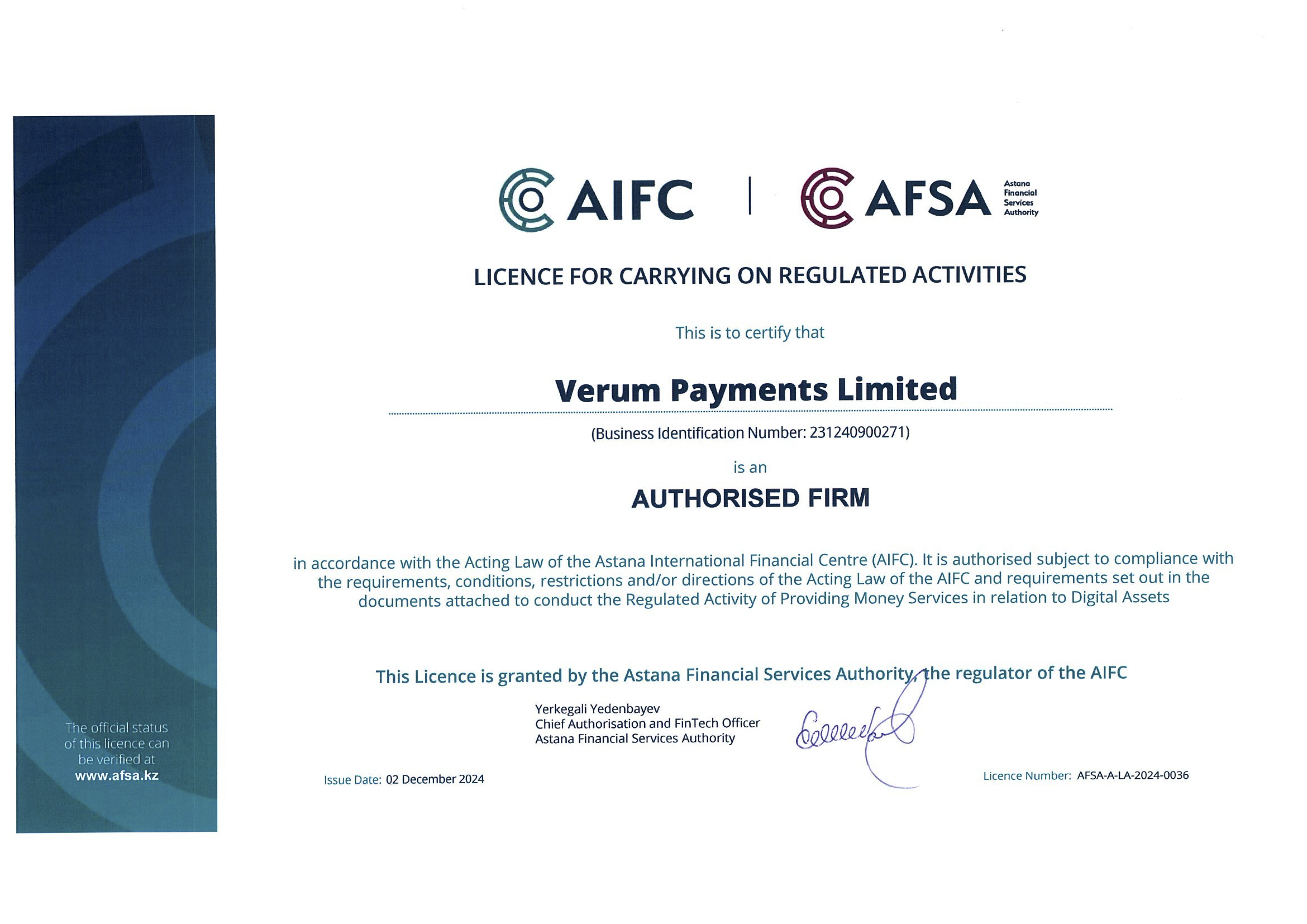
No, the tax authority does not automatically track transactions on the card.
However, as with any bank, if there are large turnovers or suspicious transactions, RBK Bank’s financial monitoring may request additional documents.
Important to Understand:
- Standard transactions (purchases, transfers, and top-ups) are not automatically reported to the tax authority.
- Information requests can occur only as part of a financial monitoring check, if transaction amounts are very large or if there are suspicions of illegal activities.
If you use CardB as a regular payment and transfer card, nothing changes for you.
When Might a Tax Obligation Arise?
- If you regularly exchange large amounts of USDT to KZT and use the card for business purposes.
- If you are a registered entrepreneur and your income from CardB exceeds the non-taxable minimum.
For personal use, the tax authority will not be interested in your transactions.
If You Are Concerned About Financial Monitoring and Taxes, Follow These Tips:
- Use the card like a regular debit card – make purchases, withdraw cash, and transfer money without worries.
- If unsure, consult a tax specialist (in 99% of cases, individuals are not subject to taxation).
- CardB is a standard bank card, not a trading account, so no additional monitoring is involved.
Conclusion:
- CardB is a fully legal service, operating under RBK Bank.
- For regular users, there are no tax or financial monitoring risks.
- You can use the card worry-free – transactions, payments, and top-ups work like with any other bank.
For any additional questions, contact support via the app or at support@cardb.finance
You’ll need your IIN and complete a liveness check.
Usually, verification takes up to 2 minutes.
Contact support with screenshots of the issue via the app or at support@cardb.finance
Immediately contact support via the app or email at support@cardb.finance
- Open Profile.
- Tap Security.
- Tap Delete account and confirm deletion.
Important: After deletion, you cannot reuse the same phone number or email to create a new account.
You can close your card in three ways:
- By visiting an RBK Bank.
- By calling the bank’s contact center at 7888.
- You can also block it via the MY RBK mobile app.
Refunds may take up to 30 business days.
The card issuance fee is non-refundable as the service has already been provided. To avoid further charges for the monthly maintenance fee, you need to close the card.
Important!
Card closure can only be done through RBK Bank – it cannot be closed via the app or customer support.
- To close the card, you need to visit an RBK Bank branch with your ID and submit a card closure request.
- If the card is not closed, the monthly maintenance fee will be charged.
To create an account, follow these steps:
- Enter your phone number & IIN. We’ll send you a confirmation code.
- Confirm your phone number. Enter the code sent to your number.
- Pass identity verification.
- Create login details:
- Enter your email.
- Create a password (min 6 characters, including at least one digit, an uppercase letter, and a lowercase letter).
- Confirm your password.
- Confirm your email. A code will be sent to your email for account protection.
- Create a passcode. This will be used to log in.
- Enable biometric verification (Face ID/Touch ID) for faster login (optional).
- Create and top up your first card and enjoy our services!
For any issues, contact support via the app or at support@cardb.finance
The cost of issuing and maintaining the card is as follows:
- Card issuance — 5,990 KZT
- Monthly maintenance — 5,990 KZT
- Card reissuance upon expiration or at the customer’s request — 5,990 KZT
For more details, please visit the “Tariffs“ page.
Yes, the following limits apply to topping up a CardB card:
- The maximum amount for non-cash deposits and cash deposits per month is $15,000
- The maximum amount for non-cash deposits and cash deposits per day is $1,000
For more details, please visit the “Tariffs“ page.
Yes, you can change your PIN code. To do this:
- Open the CardB app and log into your account
- On the main page, tap the “My Card” button
- Select “Change PIN code”
- Enter your new PIN code
- Confirm the change by entering the SMS code. The PIN code will be updated immediately after confirmation
PIN code change fees:
- The first PIN code change is free
- Subsequent PIN code changes or PIN resets — 200 KZT
For more details, please visit the “Tariffs“ page.
- Navigate to Profile in the app.
- Select Account.
- Select Change passcode.
- Enter your current passcode.
- Create and confirm a new passcode.
- Press Go to the app to complete the process.
Unfortunately, these details cannot be changed at the moment.
Debit cards are available for individuals aged 18 and older.
- Open Profile.
2. Tap App Setting.
3. Tap Language and select your preferred option.
Yes, the card supports all these payment systems.
- Adding via Apple Wallet
- Open Apple Wallet on your iPhone.
- Tap “+” (Add Card).
- Select “Credit or Debit Card”.
- Enter your CardB card details manually or scan it.
- Follow the instructions and confirm the addition via SMS code.
2. Adding via MyRBK App
- Download or log in to the MyRBK app – your CardB card will automatically appear there.
- Find your card and select “Add to Apple Pay”.
- Confirm the action and follow the instructions.
Important!
The card must be activated in the CardB/MyRBK app.
A 3D Secure code for confirmation will be sent via SMS to your phone number.
Apple Pay is supported on iPhone with Face ID or Touch ID and Apple Watch.
For any issues, contact support via the app or at support@cardb.finance
No, only one card is allowed per account.
Direct deposits to Binance using a CardB card (via Visa) are not supported, as Binance does not accept Kazakhstani cards for direct deposits via Visa/Mastercard.
However, you can top up Binance via P2P:
- Find a P2P seller who accepts RBK Bank (MyRBK).
- Make a payment through the Instant Payment System (IPS) by selecting RBK Bank.
- Receive USDT or another cryptocurrency in your wallet.
Yes, Kaspi QR payment is available! Follow these four simple steps:
- Download the MyRBK app if you don’t have it.
- Log in to MyRBK.
- Tap the Kaspi QR icon in the top left corner.
- Scan the QR code and complete your payment.
For any issues, contact support via the app or at support@cardb.finance
Please contact support via the app or at support@cardb.finance
Reach out to support with a screenshot of the issue. Use the app or email support@cardb.finance
We have obtained a license to provide money services related to digital assets by AFSA.
No, the tax authority does not automatically track transactions on the card.
However, as with any bank, if there are large turnovers or suspicious transactions, RBK Bank’s financial monitoring may request additional documents.
Important to Understand:
- Standard transactions (purchases, transfers, and top-ups) are not automatically reported to the tax authority.
- Information requests can occur only as part of a financial monitoring check, if transaction amounts are very large or if there are suspicions of illegal activities.
If you use CardB as a regular payment and transfer card, nothing changes for you.
When Might a Tax Obligation Arise?
- If you regularly exchange large amounts of USDT to KZT and use the card for business purposes.
- If you are a registered entrepreneur and your income from CardB exceeds the non-taxable minimum.
For personal use, the tax authority will not be interested in your transactions.
If You Are Concerned About Financial Monitoring and Taxes, Follow These Tips:
- Use the card like a regular debit card – make purchases, withdraw cash, and transfer money without worries.
- If unsure, consult a tax specialist (in 99% of cases, individuals are not subject to taxation).
- CardB is a standard bank card, not a trading account, so no additional monitoring is involved.
Conclusion:
- CardB is a fully legal service, operating under RBK Bank.
- For regular users, there are no tax or financial monitoring risks.
- You can use the card worry-free – transactions, payments, and top-ups work like with any other bank.
For any additional questions, contact support via the app or at support@cardb.finance
You’ll need your IIN and complete a liveness check.
Usually, verification takes up to 2 minutes.
Contact support with screenshots of the issue via the app or at support@cardb.finance
Immediately contact support via the app or email at support@cardb.finance
- Open Profile.
- Tap Security.
- Tap Delete account and confirm deletion.
Important: After deletion, you cannot reuse the same phone number or email to create a new account.
You can close your card in three ways:
- By visiting an RBK Bank.
- By calling the bank’s contact center at 7888.
- You can also block it via the MY RBK mobile app.
Refunds may take up to 30 business days.
The card issuance fee is non-refundable as the service has already been provided. To avoid further charges for the monthly maintenance fee, you need to close the card.
Important!
Card closure can only be done through RBK Bank – it cannot be closed via the app or customer support.
- To close the card, you need to visit an RBK Bank branch with your ID and submit a card closure request.
- If the card is not closed, the monthly maintenance fee will be charged.